AI video generator for social media, from your site
QuQi's AI video generator reads your website, then films a short social video with your products, a voice and music, and checks it before you post.

Search for an AI video generator and you'll find dozens of tools that promise a social video from a link. Paste your address, wait a minute, and you get stock clips stitched together under a voice that could be selling anything. The captions are in a font your brand has never used. Your actual products are nowhere to be seen.
We wanted something else for QuQi customers: a short video that looks like it came from someone who studied the business first. So we stopped treating video as one prompt and one model call. QuQi's producer is an AI agent with a computer of its own. It opens your website the way a visitor would, plans each scene, builds the film, listens back to it and measures the text. Only then does it hand the video to you.
This article is for the business owner who wants good videos on TikTok, Reels and Shorts without hiring an editor. If you're curious about the machinery underneath, we wrote a separate piece on how Claude makes videos and images inside QuQi.
What you get back
A finished video, ready to post. By default it's vertical, 9:16 at 1080 by 1920 pixels, because that's the shape TikTok, Instagram Reels and YouTube Shorts are built around. Square (1:1), wide (16:9), 4:5 and 3:4 are there when you need them.
The length is the agent's call unless you set it, and it usually lands somewhere between 12 and 30 seconds. Ask for anything from 5 to 90 seconds and it plans for that instead. The picture never runs on more than two seconds past the last spoken word, so there's no dead air at the end while viewers wonder whether the video froze.
Inside each video you'll find:
- a voice recorded in a single take, so it sounds like one person and not a patchwork of sentences
- one music bed under the whole film
- a handful of sound effects, cut and placed one by one where the scenes change
- captions when they help, timed to the spoken words
- your products, your photos and your brand's own fonts and colours
The file is an MP4 at 30 frames a second, the kind every major platform accepts without complaint. It lands in your Studio library, and from there it can go out with a post on the channels you've connected, YouTube included.
Three ways to ask for a video
From the Studio
Press Make something new, choose Video and answer one question: what is it about? A few sentences is plenty. The form's own example is a good model: "Our spring sale: 30% off every plant pot until Sunday. For people setting up a balcony garden." That's the right size. It says what the message is, who it's for and what must be said. You can also pick the length, the shape and the language.
In a chat
Ask the lead or the Video Producer for a video in plain words, the same way you'd ask a colleague. When the video is ready, the chat tells you it's waiting in the Studio.
On the calendar
The Video Producer has its own slot on your crew's calendar: a short video every Friday at 14:00, unless you move it. It looks at what the business is doing now and makes something about it, so your channels get a video each week without you having to think of one.
What happens between your request and the video
Most of the work happens before a single frame is rendered. Here's the order the agent goes in.
It studies the business first
Before it's allowed to order a single clip, the agent has to do its homework. It reads your business profile in QuQi: what you sell, who buys it, the competitors it must never show, your brand colours and logo, and any corrections you've made. Your corrections win over anything else it finds.
Then it opens your website in a real browser and looks around the way a visitor does, starting with the home page and any page your request mentions. QuQi won't accept a plan until the agent has actually been to the site. If you sell through Shopify or WooCommerce, or you've connected a product feed, it pulls your real products with their photos. It can also ask QuQi up to 12 questions about the business while it works.
All of this goes into written research notes. No notes, no ordering.
It plans every scene and says why
The plan is where most AI video goes wrong, so QuQi makes the agent show its working. Every scene has to name where its picture comes from, and give a reason. There are four possible sources. Your website gives your own photos, products and words. Stock gives free footage, kept to about a third of the film at most. A generated clip is allowed once per video, only where nothing else will do. And code covers the animation the agent draws itself, from moving type to simple 3D.
It also reads from a library of film craft (product films, explainers, motion b-roll, short-ad structures and more), opens at least three of those guides for every video, and writes down which ones it compared and why the technique it picked suits your business. Last, it has to say how this video will differ from your brand's last three. That one rule does a lot to stop every Friday video looking like the one before it.
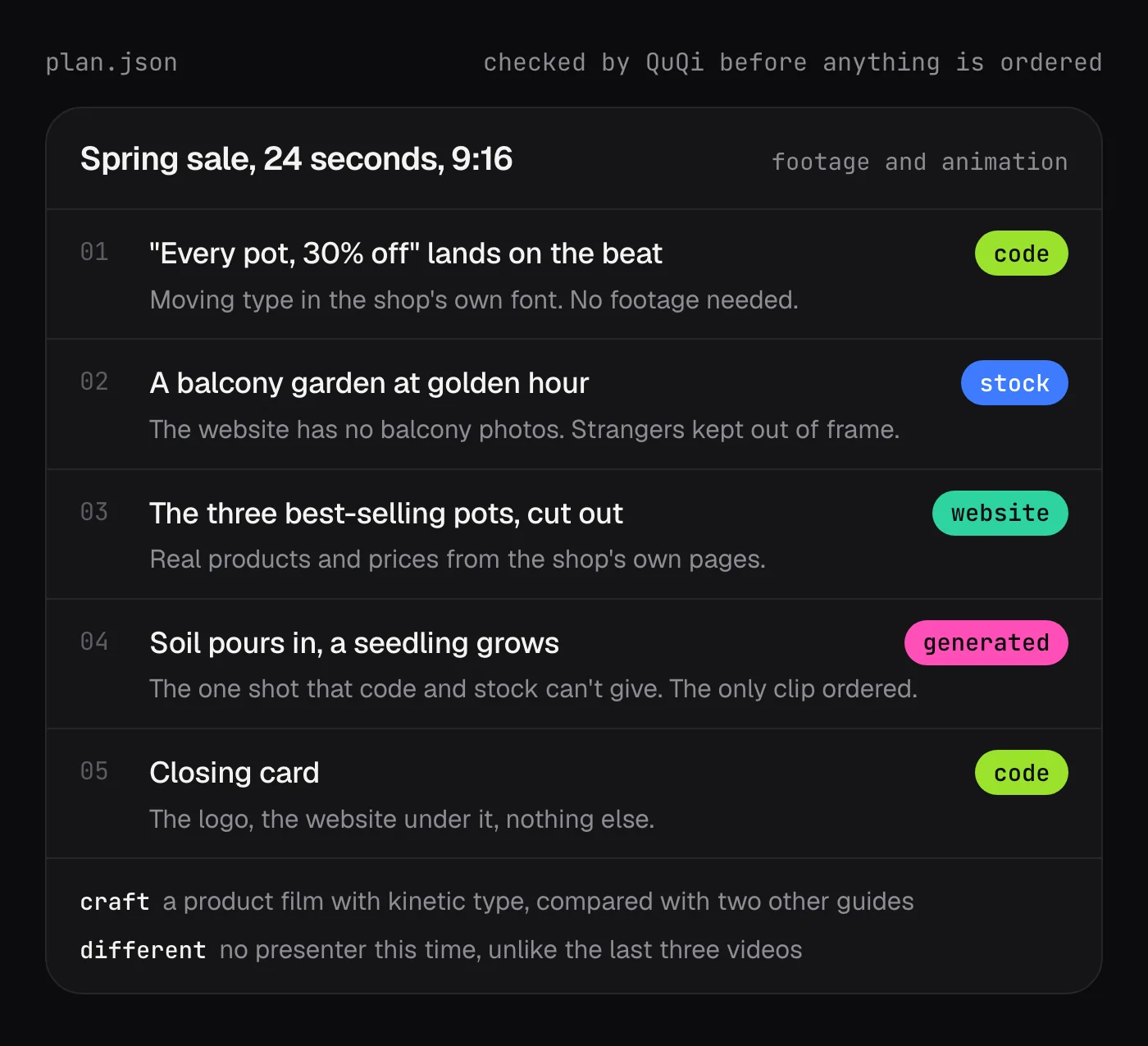
It builds the film like a motion designer would
This is the part that surprises people. The scenes aren't painted by an image model. The agent builds each scene as a web page, in your website's own fonts and colours, then steps through it frame by frame in a browser and encodes the frames with ffmpeg, the same tool much of the video world runs on behind the scenes.
That's why the words in a QuQi video are spelled right. They're real type, set by code, not letters an AI tried to draw. It's also why your logo looks like your logo.
The sound gets the same care. There's one voice take, never sped up to squeeze into a scene, plus one music bed and one batch of sound effects that the agent cuts and lays on the changes itself. If someone speaks to the camera, QuQi casts a new fictional presenter for that video and syncs the lips only for the seconds they're on screen. No famous face or lookalike ever appears, and a stranger from stock footage is never passed off as your staff.
It checks its own work with a ruler
Before the final render, the agent opens every scene in Chrome at full size and measures it. The check flags words outside the safe area (on a vertical video, nothing in the top tenth or the bottom fifth, where the app's own buttons sit), text under 32 pixels, letters that touch, lines packed too tightly, too many type sizes, things that overlap, a logo too small to read, and pictures that have been stretched.
When the video is finished, QuQi runs its own checks on the file. If the length is off the brief, if the picture runs on past the voice, or if a transcriber can't make out at least half of the spoken words, the video goes back to be fixed. A 30-second film takes about five minutes to render, so a second pass doesn't eat your afternoon.
Changing a video after you've watched it
The first cut is rarely the final word, and the producer is built for that. The machine that made your video is kept for two days after delivery, with every file still on it, and each change you make adds two more days. Open the video's Edit box and say what you want, or tap one of the ready starters such as "Make the music calmer" or "Use another voice".
You pay only for what changed. Swap the music and the new sound is mixed over the picture you already have, with no new frames rendered. Change a line in one scene and only those seconds are rebuilt. Once you approve or publish the video, or the two days run out, the machine is let go and Edit becomes Regenerate.
What it won't do
Some rules hold whatever a request says:
- No templates. QuQi hands the agent no ready-made kits, templates, sound files or pictures, so each video starts from your business, not from a theme a thousand other accounts are using.
- No famous people, no lookalikes and no other brand's logo.
- No claims your business doesn't make. If your site says "up to 30% off", the video says "up to 30% off", qualifier and all.
- Your brand's colours, fonts and logo win over any style a request names.
What it costs
Videos are paid in QuQi credits, from the same pool as the rest of your crew's work. When a video starts, QuQi sets credits aside. You pay for what the video actually uses and the rest comes back. Because every video is made with real computer time, the cost moves a little from one to the next.
You also choose how much care goes in. There are three levels: Standard ("good videos, made faster, for less"), Normal ("careful filming, motion and review") and High quality, the most careful of the three, for the pieces that matter most. Videos start on Normal. Settings show what a video usually costs at each level, and the pricing page shows the credits that come with each plan.
How to get a better first video
The agent does its own research, but you know things your website doesn't say. A few habits make a real difference:
- Say who it's for. "For people setting up a balcony garden" changes the whole film, from the shots to the voice.
- Give the offer in your exact words, with dates and conditions. The video quotes them as written instead of paraphrasing.
- Spend ten minutes on your business profile. Fix anything wrong there and every video after it gets better.
- If you sell products, connect your store or a product feed. Your real products beat any stock shot.
- Say so if you want animation only. Some brands don't want footage at all, and the plan respects that.
- Name the length if it matters to you. Otherwise the agent picks what the message needs.
Questions people ask
Is this a template video maker?
No. Each video is planned and built for one request, from your website and your business profile. There's no theme picker and no library of looks to choose from, and the agent has to explain how each new video differs from your last three.
Which platforms are the videos made for?
Vertical 9:16 is the default, for TikTok, Instagram Reels and YouTube Shorts. Square, wide, 4:5 and 3:4 cover feeds, LinkedIn and your own website. In 9:16 the words stay clear of the areas where each app puts its buttons and captions.
Can it make videos in other languages?
Yes. Pick the language in the Studio form. The voice comes from an engine that handles the language you chose, and the words on screen are set in it too.
How long does a video take?
Most of the time goes into research, planning and checking. The render itself takes about five minutes for a 30-second film, and QuQi gives a video up to 40 minutes of machine time in all (75 for one longer than 30 seconds).