Google AI Mode now puts links higher: what to do
Google's October 15 update adds more links to AI Mode and AI Overviews. What changed, what it means for your site, and what to fix this month.

On October 15, 2026, Google announced a set of changes to AI Overviews and AI Mode, and almost all of them are about one thing: links. More of them inside the answer, placed higher up, with pictures beside them and a new spot at the top for the one or two pages you actually need.
If you run a website, that's good news with a catch. Google didn't say how many more clicks it expects, and its own reports still won't tell you who clicked. Below is what changed, what it means for a business site, and what to do about it this month.
What Google changed in AI Mode and AI Overviews
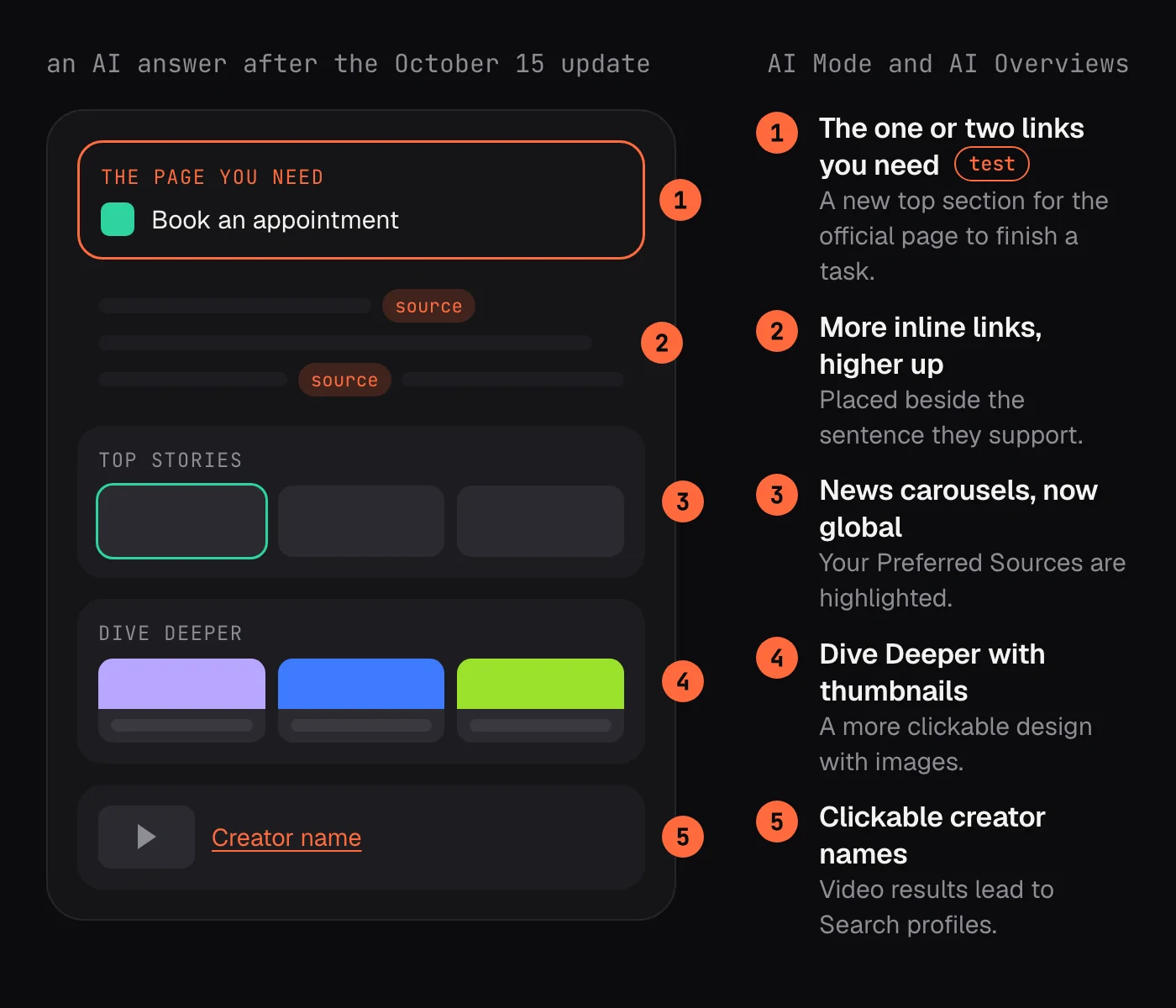
The announcement came from Nick Fox, Google's SVP of Knowledge and Information, in a post about helping people "find links to click out and dive deeper". He listed five updates, some live and some still being tested:
- More inline links placed directly inside the AI response, and higher up in it more often.
- A new section at the top of a response that highlights the one or two links you need to finish a specific task or find exact information. This one is a test.
- News carousels for timely topics, now available globally, which also highlight your Preferred Sources.
- A redesigned Dive Deeper section at the end of some answers, with image thumbnails and a more clickable design.
- Clickable publisher and creator names in video results, leading to their Search profiles.
Coverage from 9to5Google adds that Google will show "context about why each link is useful", and that the new top section is aimed at sites that are the "one or two official places on the web" for a task.
Two numbers came with it. The number of people who have chosen Preferred Sources has grown seven times since the start of the year. And more than 400 publications now take part in Google's News AI pilot, where Google pays for enhanced content it uses to build AI features.
What the announcement doesn't tell you
None of these changes came with a figure for visits. More links in an answer doesn't automatically mean more people leave the answer to visit them.
Your own data won't settle it either. Search Console's generative AI performance report, which reached every site on August 31, counts impressions from AI Overviews and AI Mode. It doesn't count clicks. Google's John Mueller has also said the position shown in that report is where the AI block sits on the page, not where your link sits inside it.
So for now, the only way to know whether a higher link brought you readers is your own analytics: visits that landed on the pages Google cites.
Why it matters for a business website
Each change rewards a slightly different kind of page.
Inline links reward the page that says it best
An inline link sits next to the sentence it supports. Google picks the page whose words back up that exact claim. A page that answers a question in one clear, quotable passage has a better chance than one that circles the topic for five paragraphs.
The top section rewards the official page
If someone asks how to book a table at your restaurant, renew a membership or return an order, the official place to do it is your page. The new section is built to send people straight there. It's still a test, but it's a clear signal: when a task has an obvious home, Google wants to show it first.
Thumbnails reward pages with a real picture
Dive Deeper links now come with image thumbnails. A page with no image, or a generic stock photo, stands out less next to one with a clear, relevant picture.
Preferred Sources reward loyal readers
Preferred Sources lets people pick sites they want to see more of, and those choices now show up in news carousels too. A business that publishes regularly has a reason to ask its readers to add it.
What it means for your kind of site
A local service business
For a plumber, a dentist or a salon, the questions that matter are practical: do you cover my area, what does it cost, can I book today. Those are tasks, and tasks are exactly what the new top section is designed for. Your booking page, your price list and your service-area page are the pages to get right first. Make sure each one says the essentials in its first lines, in plain words, with the town names and hours written out rather than buried in an image.
An online shop
Shoppers ask AI to compare: which is better for wide feet, which comes in recycled material, which ships by Friday. Inline links go to the page that states the deciding fact. Product pages that list sizes, materials, delivery times and return terms as text, with clear photos, give an AI something specific to point at. A category page full of thumbnails and little text gives it nothing.
A publisher or blog
News carousels and Preferred Sources are the parts aimed at you. Fresh, dated articles on timely topics are what carousels pull from, and readers who have chosen you as a preferred source will see more of you there. A short, visible line asking regular readers to add you is worth testing.
What to do this month
None of this needs a new strategy. It needs a few pages checked and a few habits started.
- List the tasks people come to you for (booking, pricing, ordering, returns, support) and make sure each has one clear page with a title that names the task. Two half-pages on the same task split the signal.
- Put the answer near the top. A short paragraph that answers the question in plain words, then the detail. Headings that read like the questions people ask help Google match a passage to a query.
- Give every important page a real, relevant image, set as its preview image, with alt text that describes it. If your robots meta tag limits image previews, check that it allows large ones.
- Keep facts current. Prices, opening hours and policies that changed last month but not on your site are the fastest way to lose a citation to someone else.
- If you publish news or regular articles, ask readers to add your site as a Preferred Source. Google has made it a visible choice for a reason.
- If you publish video, check whether your channel is eligible for a Search profile, so your name in AI Mode video results becomes a link.
- Track two things side by side: impressions in Search Console's generative AI report, and visits to the same pages in your analytics. When the first rises and the second doesn't, the link is seen but not clicked.
One caution. SEO forecasters expect a Google core update soon, and recent documentation already names scaled, templated content and invented authors as quality problems. Adding thin pages to chase AI links is more likely to hurt than help.
How QuQi helps you see AI answers
The hard part of AI search is that you can't see it from your own site. You don't know which questions mention you, which name a competitor instead, or whether last month's changes moved anything.
QuQi's AI Visibility teammate checks that every week. It puts the questions your buyers ask to Google's AI Overview and to ChatGPT, Perplexity and Gemini, and records who appears in each answer. When a competitor is named instead of you, that gap becomes a brief for the Copywriter, so the next article is written to close it.
Alongside it, the SEO Auditor keeps the technical side healthy and the Page Optimizer rewrites titles, descriptions and structured data on the pages that matter most. If you want the background on why AI answers work differently from blue links, start with our guide to GEO.
Questions people ask
What is Google AI Mode?
AI Mode is Google's conversational search, where you ask a question and get a written answer with links, then follow up in the same thread. AI Overviews are the shorter AI summaries that appear at the top of a normal results page. The October changes apply to both.
Do clicks from AI Overviews show in Search Console?
Not separately. Search Console's generative AI report shows impressions from AI Overviews and AI Mode, not clicks. To see visits, look at the landing pages in your own analytics.
How do I get into the new top section for official links?
Google hasn't published how it chooses them, and the section is still a test. The safest bet is the obvious one: for each task people come to you for, have a single, clearly titled page that lets them do it.
Is this live everywhere?
Not all of it. News carousels and Preferred Sources are expanding to more countries and languages, and the top section is a test. Expect to see the changes arrive at different times in different places.