AI carousel maker for on-brand social media posts
How QuQi makes social media pictures and carousels in your own fonts, logo and colours, with real type, real products and a shape for every channel.

Ask most AI image tools for an Instagram post with a headline on it and you know what comes back. A glossy picture, a headline with one letter melting into the next, and a font that belongs to nobody. It looks like AI because it is AI, and your followers can tell before they've read a word.
QuQi makes its social pictures and carousels a different way. An AI agent designs each one as a web page, sets every word in your website's own fonts, places your logo and your real products, then renders the page as an image and measures the result. An image model gets one job at most: a realistic photo, when the post truly needs one and your website doesn't have it. It never draws a single letter.
Below is how that works, the rules every picture follows, and what you can do to get pictures that look like they came from your own designer.
Where QuQi's pictures come from
Every picture is made new, for one post or one request. Nothing is pulled from a template gallery. You'll meet them in four places.
- Social posts. When the Social Copywriter writes a post, the picture is made for that post and shared by every channel it goes to. Instagram, TikTok and Pinterest always need one. On Facebook, LinkedIn, X, Threads and Google Business, a picture comes when the post has an idea for one.
- The approval box. Don't like the picture on a draft? Ask for a new one right there, or describe the change you want.
- The Studio. Make something new lets you choose Picture or Carousel and describe it in a few sentences.
- The API. Developers can start a picture with one request and collect it when it's done.
Your brand, read from your website
The agent starts where a good designer would: on your website. It opens the site in a real browser and looks at it as a visitor would. It reads your business profile in QuQi too, including any corrections you've made there, and those corrections win.
From the website it takes your fonts, straight from the site's own stylesheets, and a logo with a see-through background if your site has one. It checks that the corners really are transparent before using it. Only when the site has no clean logo does it fall back to the one you gave QuQi.
Your colours, fonts and logo then win over any colour or style a request names. A brief that says "make it pink" won't turn a navy brand pink.
Photos come from three places:
- Your website and your store. Product photos are taken from your own pages or your shop, and QuQi cuts them out cleanly so they can sit on any background.
- Free stock, for scenes your site can't show. A stranger from a stock photo is never presented as your staff or your customer.
- One generated photo at most per picture or carousel. It has to look real, and it's only used when the post genuinely calls for it.
The rules for a single picture
A post picture follows a short list of house rules. Some sound obvious. All of them are things AI pictures usually get wrong.
- One picture, one message. If a post has five points to make, it should be a carousel.
- Never words alone. There's always a picture doing part of the work.
- Words on a photo sit over a shade that keeps them readable, whatever is behind them.
- Your logo is a signature, small, about a quarter of the picture's width. It isn't a billboard.
- Your web address goes on only when you ask for it.
Picture or carousel: which to ask for
The first rule above settles most of it. If the post has one thing to say, it's a picture. If it has a list, a sequence or an argument that builds, it's a carousel.
The examples in QuQi's own Studio form show the split well. "We now open on Saturdays from 9 to 2. For regulars who work during the week." is a picture: one fact, one audience, nothing to swipe through. "Five mistakes people make when they buy running shoes, and how a fitting with us avoids each one." is a carousel, because each mistake earns its own slide and the reader wants to get to the end.
A few more that tend to work as carousels: a how-to in steps, a before and after, a short buyer's guide, three products for three kinds of customer. A sale, an event date, a new opening time or a single product launch usually works better as one strong picture.
If you're still not sure, ask yourself whether a reader would want to swipe. If they would, it's a carousel.
How a carousel is put together
Carousels earn their place in a feed because people swipe through them. QuQi builds them in three parts, the way social designers do.
- A cover that stops the scroll. This is where the one real photo goes.
- A set of slides that share one layout, so the eye knows where to look on every swipe. The set carries graphics: numbers, steps, short lines of text.
- A closing card with your logo and your website under it, centred, and nothing else. No button and no box.
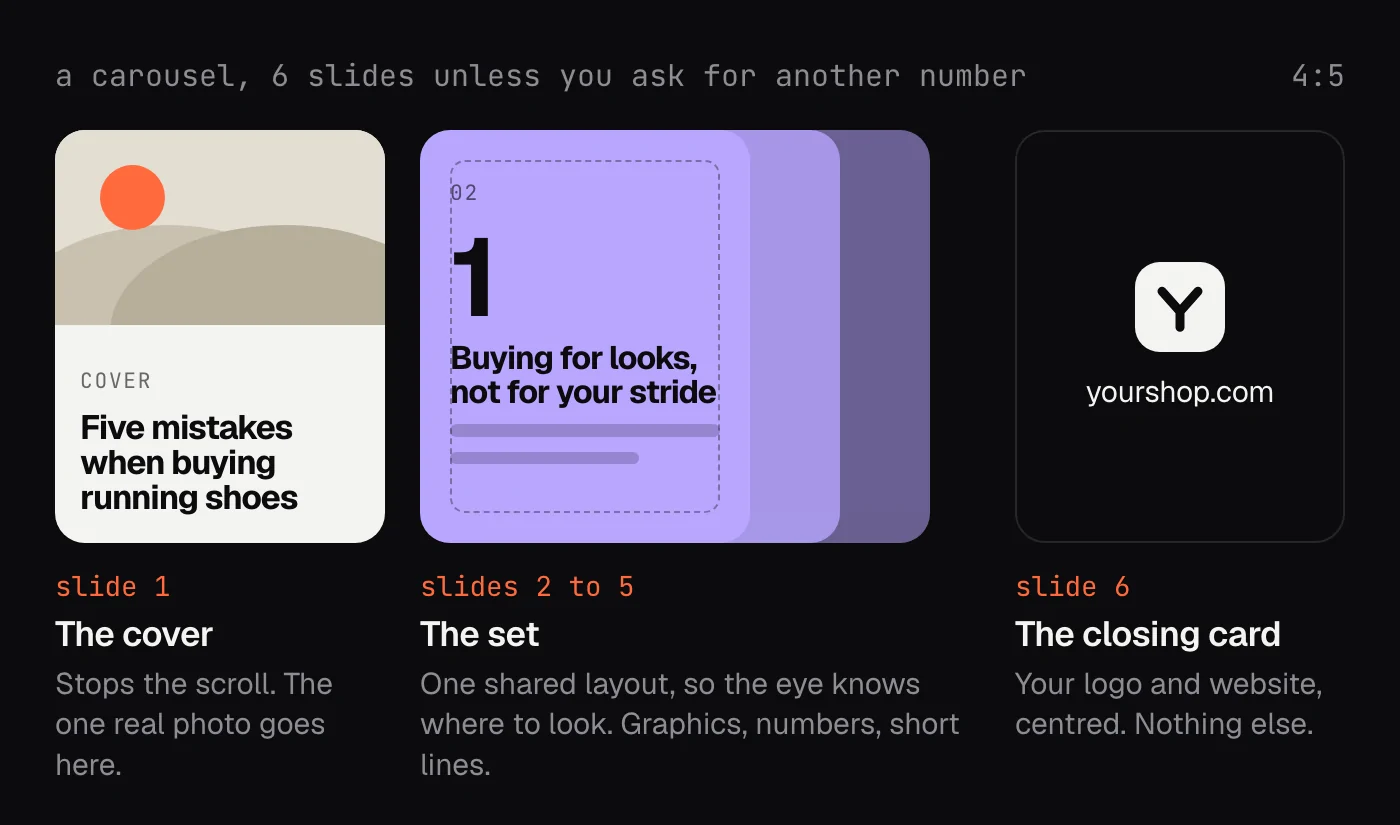
A carousel has between 2 and 10 slides, and six unless you ask for a different number. Your website appears on the closing card only, written as its name alone, never with "Visit" in front of it.
LinkedIn is the odd one out. Carousels there work as documents you swipe through, so when a carousel is posted to LinkedIn, QuQi turns the slides into a PDF and posts that. You don't have to make anything twice.
One picture, every channel's shape
Every network wants a different shape. Instagram's feed is 4:5, TikTok is 9:16, LinkedIn and X are wide, and Pinterest is 2:3. A single post often goes to several of them at once, so the Social Copywriter's settings have a choice for it, called Picture on each channel. It has three options.
- Same everywhere, the default. Every channel gets the picture exactly as it was made, at no extra cost.
- Blurred background. Each channel gets the whole picture in its own shape, framed by a soft, blurred copy of itself. Also no extra cost.
- Made for each channel. The picture is laid out again for every shape its channels need, with every word whole and inside the frame. This takes a little longer and uses a few more credits.
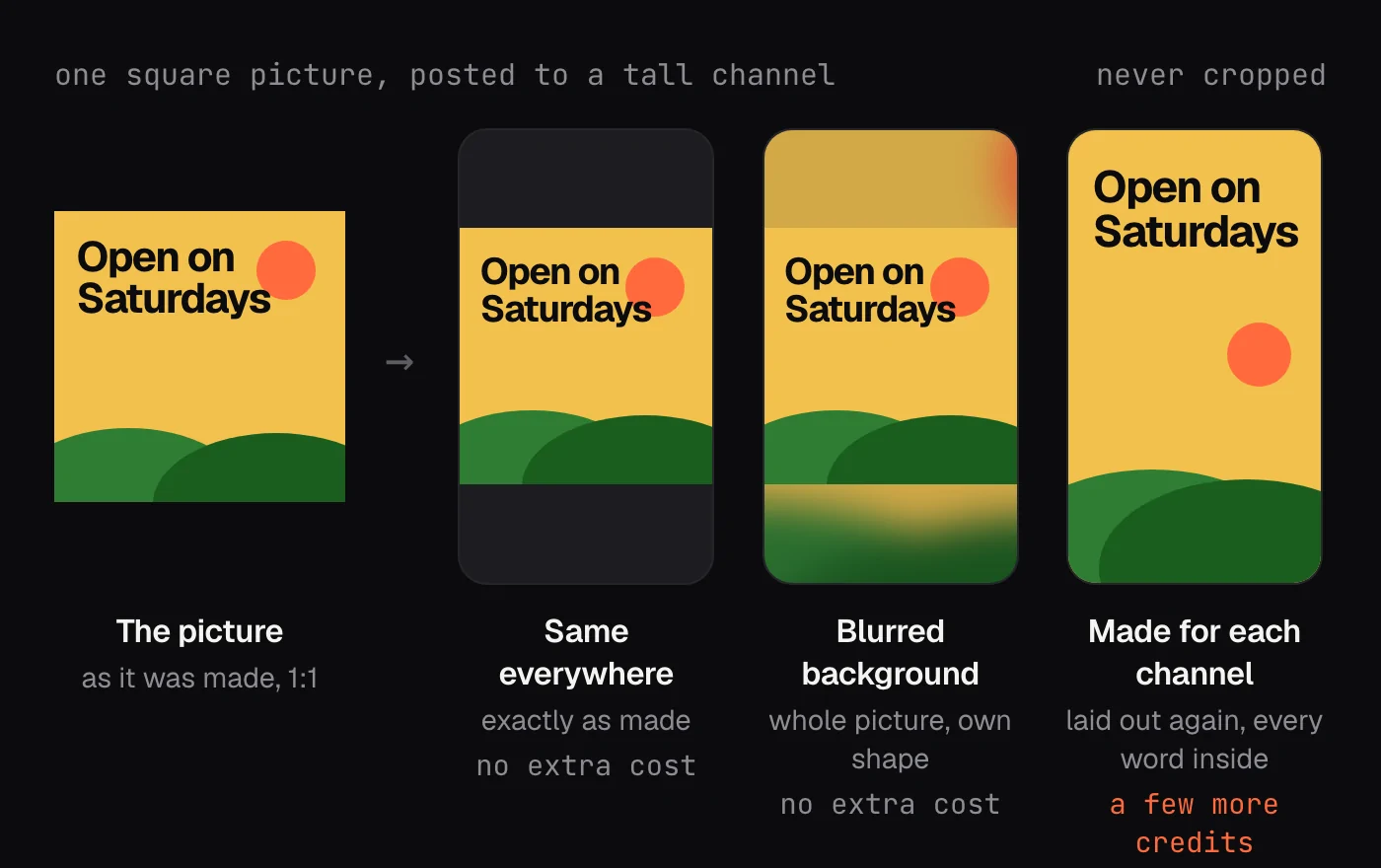
Whichever you pick, a picture is never cropped to fit. Losing the last word of a headline to a square crop is one of the ways automated posting gives itself away, and QuQi doesn't do it. Carousel slides keep one shape on every channel.
The check before you ever see it
Good design is mostly measurable, so QuQi measures it. Before a picture or carousel is delivered, the agent opens each one in a browser at its real size and checks the type against a short set of rules.
- No more than four type sizes, each at least a quarter larger than the next, so the order of reading is clear at a glance.
- Headline letters never squeezed more than 2 percent, and no two letters touching.
- Line spacing between 1.05 and 1.2 for headlines, and between 1.35 and 1.6 for body text.
- Nothing too small to read on a phone, nothing outside the safe area and nothing clipped by its box.
- A logo big enough to read, and photos that haven't been stretched or blown up past their real size.
- A highlight behind a word that fits its own line instead of bumping into the next one.
On a carousel it also checks that the set slides really share one layout and that the closing card sits in the middle. Anything flagged gets fixed before the picture moves on.
These are measurements, not a second AI's opinion. The agent is its own reviewer, and a ruler doesn't care how pleased it is with the design.
Approving, changing and letting it run
The Social posts switch, under Approvals in Settings, decides what happens when a post is ready. A new crew starts with it on, so each post goes out on your channels as soon as it's written, or at its time in the calendar, picture and all.
Switch it off and each post waits for your OK in an approval box in the Social Copywriter's chat. If the picture is still being made, the box says so ("Its picture is being made: a few minutes."), and the post carries on as soon as it lands.
To change a picture, say what you want in the box. The machine that made it keeps its files for two days, so the change is made on top of the existing design. As the box puts it, only the change is paid for, not a new picture.
Quality levels and cost
Pictures and carousels are paid in credits. Each piece is designed with real computer time, so the cost moves a little from one to the next. QuQi sets credits aside when a piece starts, and whatever isn't used comes back. Settings show what a picture and a carousel usually cost.
There are three levels of care. Standard gives "good design, made faster, for less". Normal adds careful design and review. High quality is "our most careful design and review, for the pieces that matter most", and it's the level pictures and carousels start on.
Tips for pictures that look like yours
- Check your business profile first. Your brand colours, your logo and your corrections all live there.
- Make sure your website has a clean logo file with a transparent background. If it's there, QuQi will find it.
- Connect your store or a product feed, so your real products turn up instead of stock.
- Brief it like you'd brief a person: the message, who it's for, and anything it must say word for word. The Studio's own example is a good one: "Five mistakes people make when they buy running shoes, and how a fitting with us avoids each one."
- Ask for your web address on a single picture if you want it there. It's left off unless you do.
Questions people ask
Does QuQi use AI to draw the text on a picture?
No. Every word is real type, set by the agent in your fonts and rendered by a browser. That's why headlines are spelled right and line up properly. An image model is only ever asked for a photo, never for lettering.
What sizes does it make?
A single picture is square by default, 1080 by 1080 pixels. A carousel is 4:5, 1080 by 1350. Tall 9:16, wide 16:9 and 3:4 are available too, and the Picture on each channel setting decides how a post's picture fits the other networks.
Can I use my own photos?
Yes. Drop a photo into the Social Copywriter's chat and it can use it as a post's picture. Product photos from your website or store are picked up on their own.
How is this different from an AI image generator?
An image generator turns a prompt into pixels in one go, text included. QuQi's agent researches your site, plans the design, builds it with real type and your real assets, measures it and fixes what fails. A generated photo can be one ingredient, but the design itself is made the way a designer makes it.